À la une
WhatCable: Know what your USB-C cable can really do
Publié le
WhatCable

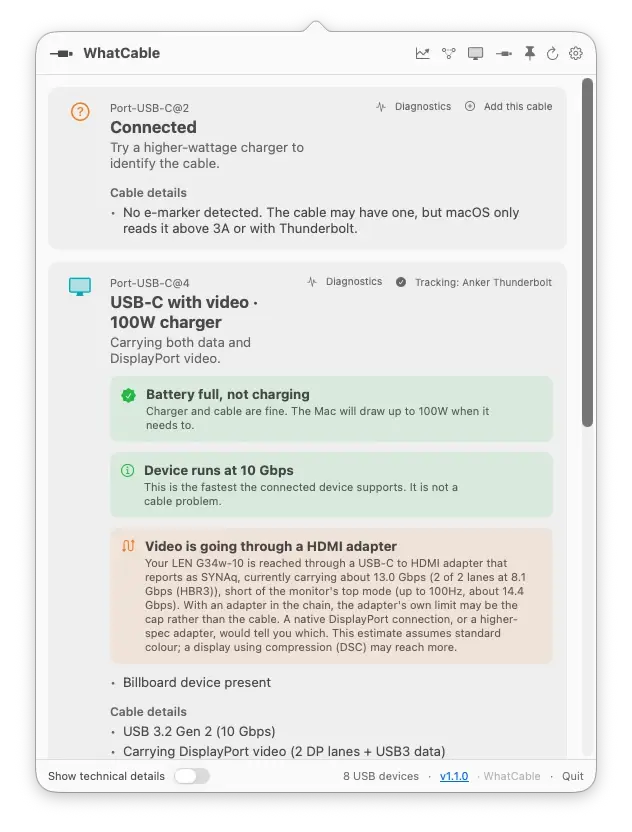
WhatCable menu bar popover showing two USB-C ports. One has no e-marker yet so WhatCable offers an Add this cable action. The other is carrying both data and DisplayPort video to a 100W charger over a named Anker Thunderbolt cable that WhatCable is tracking, with a Display Diagnostics note that the video is going through a HDMI adapter holding the display below its top mode.
The problem
Every USB-C cable looks the same. They are not.
Your drawer is full of identical-looking cables. Some charge at full speed, some crawl. Some carry video, some can barely handle a mouse. The connector tells you nothing. And the cable that worked last month might be the one that has started misbehaving today.
Features
Plain answers for cables that all look the same.
WhatCable reads the USB-C and USB Power Delivery details macOS already exposes, then turns them into useful labels, charging diagnostics, and port-by-port device context.
See whether the cable, charger, or Mac is limiting the current charge rate, with the negotiated power profile highlighted.
If a cable develops trouble while it is plugged in (an overcurrent or the connection dropping and reconnecting), a banner appears on the port. Catches faults that only show up under load.
A plain-English verdict on what is limiting the link: the Mac port, the cable, or the device, so you know whether a faster cable would actually help.
When a monitor is connected, see whether the link is carrying its full resolution and refresh, or falling short, and whether an adapter, the cable, or the selected mode is the limit.
Free, with optional Pro
The free app tells you what your cable can do and, in plain English, where the bottleneck is. Pro shows you the full picture: live power flowing through each port, real-time PD contracts, the full negotiation breakdown of every connection, port health over time, and the raw VDO fingerprints behind every cable.
15 advanced features, £9.99 one-time, works on up to 2 Macs.
CLI
The bundled CLI gives you quick snapshots, structured JSON for scripts, and watch mode when you are swapping cables during testing.
$ whatcable
USB-C Port 1
✓ Charging well at 96W
Cable: 5A, 100W, USB4 40 Gbps
Charger: 5V / 9V / 15V / 20V PDOs
USB-C Port 2
! Cable is limiting charging speed
Cable: 3A, 60W, USB 2.0
Device: External SSD, USB 10 Gbps
Cable trust signals
WhatCable checks the e-marker data against the USB Power Delivery spec. When something looks unusual, an orange card appears with the details. It is not a guarantee the cable is fake, but it tells you where to look.
Cable database
Cables seen by WhatCable users.
Every cable reported through the app gets added to a public, searchable database. Check if your cable has been seen before, or browse what others are using.
Settings
Make it yours.
WhatCable stays out of the way until you need it. A few settings let you control how it runs and what it shows.
Pro
Need more? Pro goes deeper.
The free app covers cable identity, charging info, device detection, and a plain-English verdict on what is limiting each link. Pro adds Cable history so a named cable’s performance is recorded over time, Negotiation Diagnostics with Mac port, cable, and device side by side and the weak link called out, Display Diagnostics showing whether the link is carrying your monitor’s full resolution and refresh, plus live power metering, PD contract inspection, port health counters, a full-screen terminal dashboard, and more. All from IOKit, no extra software needed.
No. Intel Macs use Titan Ridge Thunderbolt controllers that don’t expose USB-PD state or cable e-marker data through any public macOS API. WhatCable needs Apple Silicon (M1 or later) to read this information.
Yes. The WhatCable app is free and open source under the MIT licence. No ads, no tracking. WhatCable Pro (£9.99, optional) adds advanced diagnostics for power users. See what’s included.
Pro unlocks 15 advanced features including cable history (named cables with a recorded timeline), live power metering, Negotiation and Display Diagnostics, port health counters, PD contract inspection, and raw VDO identity. One-time £9.99, no subscription, works on up to 2 Macs. See full features and comparison.
No. There are no analytics, no telemetry, and no network requests. The app reads local IOKit data and nothing else. Check the source on GitHub if you want to verify.
Two reasons. Either the cable has no e-marker chip (cheap USB 2.0 cables and many cables rated at 3A or below don’t have one), or it has a chip but macOS hasn’t read it. macOS only asks a cable to identify itself when the connection needs it: a charge drawing more than 3A (a 5A cable on a high-wattage charger), or a Thunderbolt / USB4 link. Plug a marked cable into a low-power charger or a plain data connection and macOS may never query it, so there’s nothing for WhatCable to show. To force the read, connect the cable to a high-wattage charger or a Thunderbolt device.
Not definitively. The trust signals feature flags values that look unusual against the USB-PD spec, like a zero vendor ID or reserved bit patterns. A flag means “worth checking,” not “definitely counterfeit.”
What languages is WhatCable available in?
19, and the diagnostic verdicts are translated too, not just the menus: Armenian, Brazilian Portuguese, Dutch, English, French, German, Hindi, Italian, Japanese, Korean, Latvian, Norwegian, Polish, Russian, Simplified Chinese, Spanish, Traditional Chinese, Turkish, and Ukrainian. WhatCable follows your Mac’s language by default, or you can pick one in Settings. Translations are community-refinable, so if something reads oddly in your language, open an issue and we’ll fix it.
Install
Pick the install that fits how you work.
Menu bar app, command-line tool, or both. Signed, notarised, and universal. Requires macOS 14 or later on Apple Silicon.
Recommended: Homebrew
CLI only
Just the whatcable command, no menu bar app. Same signed binary, useful for terminal-only setups and scripts.
Direct download
Grab the latest .zip from GitHub Releases. The release page also has a CLI-only zip. Drag WhatCable.app into Applications.