Outils
MagicQuit - Your MacOS Efficiency Tool
Publié le

FAQ
How does it work?
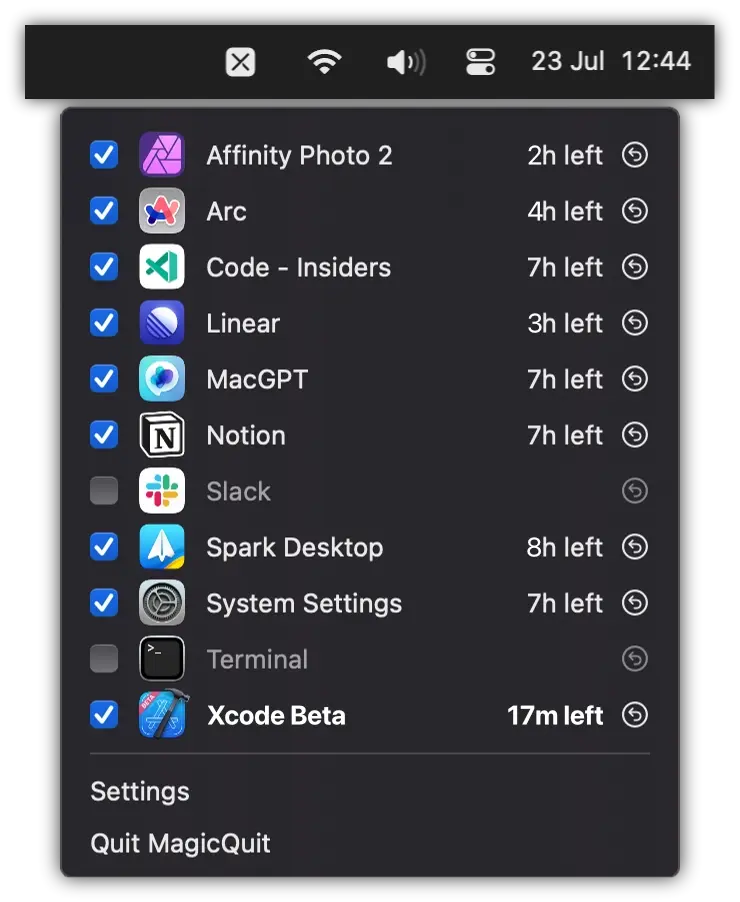
MagicQuit automatically closes apps when you don’t use them anymore. It’s that simple.
What happens when there’s unsaved data?
MagicQuit won’t forcefully close apps. When there’s unsaved data, the app will ask you to save it.
What if I don’t want to quit an app?
Simply uncheck the box next to the app name in the menu bar. MagicQuit will never close this app again. System processes like Finder or Spotlight will never be closed.
How much does it cost?
It’s free. With no ads, no in-app purchases, and no subscriptions.
Do I pay with data?
No. MagicQuit is 100% offline and doesn’t send any data to any server. It’s open source, so you can check the code yourself.
Which OS is supported?
MagicQuit runs on MacOS 13 and newer.
Why did you develop it?
I was tired of having a cluttered desktop and apps using power in the background. While Arc Browser does a great job for browser tabs, alternative solutions for MacOS apps either didn’t work well for me or used way too much battery. So I developed MagicQuit.